
Legal software describes digital platforms and applications that help law firms and legal professionals carry out essential tasks such as organizing documents, monitoring deadlines, tracking compliance, and streamlining case workflows. These systems are structured to facilitate efficient handling of legal matters by centralizing records, automating document creation, and supporting collaboration among team members. By providing these functions, legal software often contributes to the day-to-day management of legal practices in a disciplined, policy-compliant manner.
The features and advantages of legal software typically address operational needs unique to the legal field. Functions may include case management modules, secure storage for client information, tools for calendaring important dates, and workflow automation. Many platforms also integrate with email and billing systems to synchronize communication and financial record-keeping. This organizational support can help legal teams maintain compliance with regulatory standards while focusing on substantive legal work.

Modern legal software solutions may centralize client and case information in a single location, reducing fragmentation of records. This can assist law practices in accessing data efficiently and ensuring that critical information is up-to-date and secure. Users often rely on permissions controls within these platforms to manage access and confidentiality in accordance with legal standards.
Document automation functions are commonly included in leading platforms, allowing legal practitioners to generate contracts, pleadings, and other documents from templates. This reduces manual entry and may lower the risk of errors in repetitive legal drafting. Automated workflows further support standardization of processes and tracking of deadlines, which are vital for meeting regulatory requirements and client expectations.
Compliance tracking is another cornerstone of many legal software systems. These tools may offer audit trails, encryption, and reporting features that help law firms document their adherence to ethical and regulatory norms. Such capabilities can be valuable in settings where legal professionals must demonstrate a history of timely and secure handling of sensitive client matters.
Integration with billing and payment tools is often provided, allowing for time-tracking, invoicing, and monitoring of client payments directly within the same system used for case handling. These integrated solutions can contribute to administrative efficiency, reducing duplicated data entry and supporting transparency in financial transactions.
In summary, legal software platforms serve as comprehensive tools designed to address the practical and compliance-related needs of legal practices. The next sections examine practical components and considerations in more detail.
Case management features are central elements of most legal software platforms. These modules organize key details about each client, case, and related documentation in a secure and accessible format. By consolidating information, law practices may increase accuracy and consistency in handling matters. Many systems also enable users to assign case-specific tasks, set reminders, and share updates among authorized team members.

Calendar and scheduling functionalities are typically embedded within case management modules. These functions help legal professionals monitor critical deadlines related to court appearances, filing dates, and client meetings. Automated notifications and calendar sharing may reduce the risk of missed appointments, supporting responsive and organized service delivery while maintaining compliance with procedural timelines.
Time tracking and task management tools, often found within case management suites, allow users to record billable and non-billable activities. Accurate tracking of time spent on various tasks can enhance transparency for both internal review and client billing. In flexible platforms, custom task categories and time entry fields help legal teams tailor workflows to the specific requirements of their practice areas.
Document storage and retrieval mechanisms complete the case management workflow. These typically offer version control, secure access, and the ability to archive or retrieve case materials as needed. Such systems may help practitioners respond to audits and regulatory inquiries with documented records, supporting both legal compliance and client service standards.
Document automation is a prominent feature offered by modern legal software, designed to streamline the creation of standard legal forms, contracts, and correspondence. By utilizing customizable templates, legal professionals can quickly generate draft documents that maintain consistency and comply with required formats. This process may help reduce errors and improve document turnaround times for client matters.

Workflow tools integrated within legal platforms help coordinate the sequence of tasks required for each case or matter. Users can assign responsibilities, monitor progress, and establish automated checkpoints to ensure all necessary steps are completed on time. This level of coordination typically supports compliance with internal policies and external regulations by reducing the likelihood of omissions.
Collaboration features often supplement automation capabilities. Legal software may allow team members to comment on, edit, or approve documents within the platform. This shared access can support quality control and enable more informed decision-making by providing all relevant parties with the latest version of documents.
Template management is also important for standardization. Legal professionals may update templates to reflect changes in laws or organizational policies, ensuring that new documents are consistently produced in accordance with the most current legal standards. This helps legal offices maintain up-to-date records and reduces time spent manually revising forms for each matter.
Compliance tracking functions are designed to assist law firms in monitoring adherence to regulatory requirements. Many legal software platforms offer audit logs, which chronologically record user actions and changes within the system. These records can be valuable for demonstrating compliance during external audits or internal reviews, providing a clear history of activity related to client cases and documents.
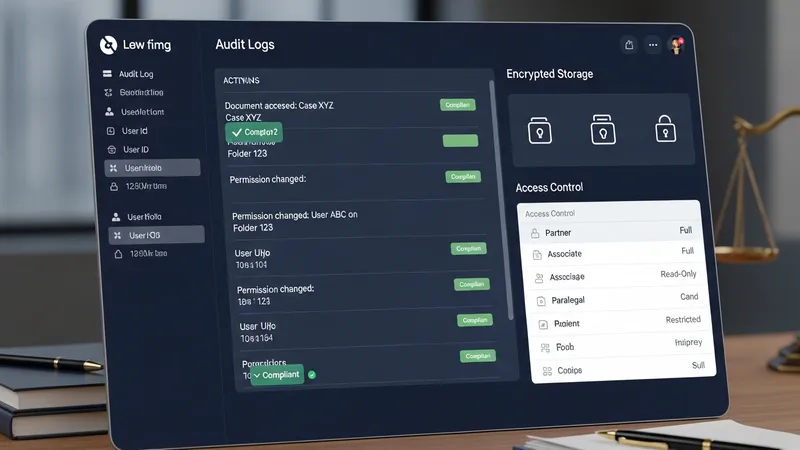
Data security is another important capability, often built into legal software through encrypted storage and secured access controls. Systems may utilize permission settings to limit who can view or edit sensitive information. By controlling access, law practices aim to comply with confidentiality obligations and protect client data from unauthorized disclosure.
Automated reminders and compliance deadlines are frequently incorporated, helping legal professionals keep track of statutory requirements. These automated alerts can support timely completion of regulatory filings and other critical tasks, reducing the administrative burden on attorneys and support staff. The ability to document timely action can also serve as evidence of due diligence in compliance matters.
Many platforms undergo third-party security assessments and may align with industry standards or certifications, providing reassurance regarding the handling of sensitive information. Legal practices often evaluate such credentials when choosing software to ensure alignment with professional and regulatory expectations.
Billing modules in legal software platforms facilitate the generation of invoices, tracking of payments, and recording of billable hours. These features, when integrated directly with case management and document storage systems, may minimize redundant data entry and help ensure accurate accounting practices. Users typically have access to customizable fee structures aligned with different types of legal services.
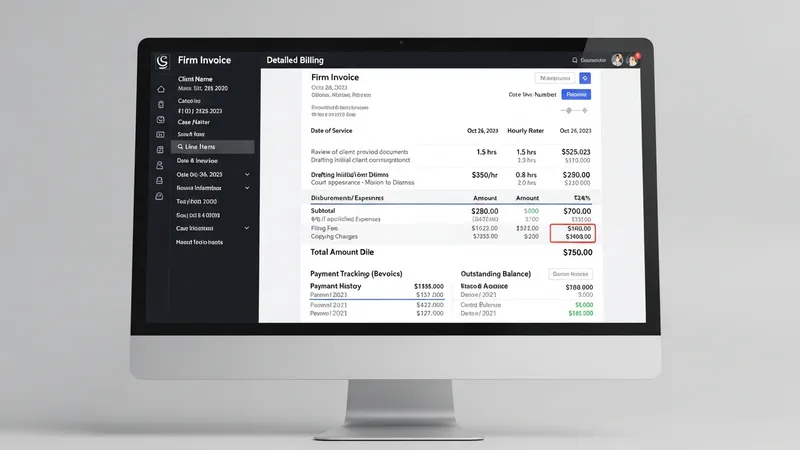
Integration capabilities extend beyond billing, as many legal software solutions can connect with external email, calendar, and document sharing tools. This interoperability supports a seamless workflow within legal practices, reducing the need to switch between multiple applications and fostering consistent recordkeeping throughout various operational areas.
Administrative efficiency gains may also arise from the ability to automate repetitive tasks, such as client onboarding or document distribution. Customizable workflows and reporting tools allow legal offices to track performance, allocate resources, and identify areas where further process improvements could be made. These efficiencies can enable practitioners to dedicate more time to substantive legal work while maintaining operational oversight.
Finally, support resources and training options are often available from legal software providers to assist with implementation and ongoing system use. Law practices may benefit from professional development offerings, webinars, or user support communities, which can contribute to effective long-term platform adoption. These resources help address any technical challenges that may arise during use and support ongoing compliance with changing industry standards.