
Legal practice management software centralizes the administrative, calendaring, and document tasks associated with handling legal matters. These systems typically bring together case files, contact records, deadlines, billing entries, and communications into a single environment so that team members can find matter-related information without switching between unrelated tools. Functionality often includes searchable matter records, secure storage for pleadings and correspondence, task lists linked to cases, and audit trails for access. The emphasis in such systems is operational consistency and traceability rather than any single workflow, and implementations can vary by firm size and practice area.
Implementation approaches may include cloud-hosted services, on-premises deployments, or hybrid arrangements that combine local storage with remote services. Integration points commonly involve email systems, calendar platforms, document editors, and accounting ledgers to reduce duplicate data entry. Administrative controls such as role-based access and encryption at rest and in transit are frequent design elements intended to protect client confidentiality and comply with applicable professional rules. Selection and configuration often reflect trade-offs between customization, ease of use, and the technical resources available to a firm.
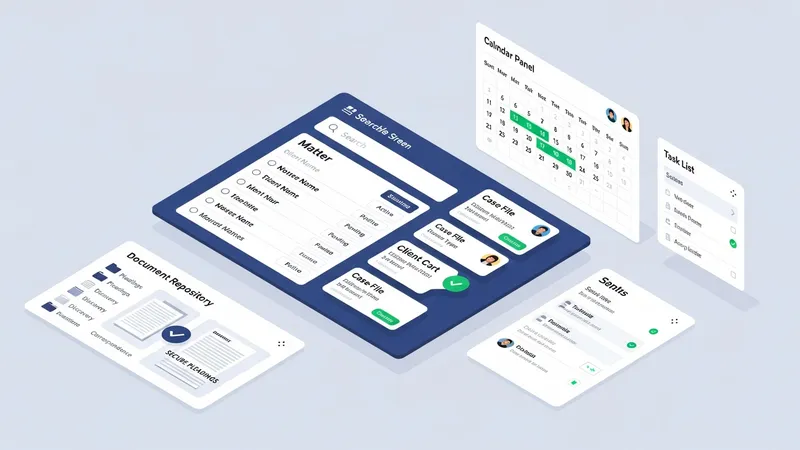
Many firms view the case management module as the structural backbone because it links people, matters, and deadlines; however, the practical emphasis can shift depending on firm priorities. For example, a small litigation practice may prioritize calendaring and e-filing integration, while a transactional firm may rely more heavily on document templates and approval routing. When assessing feature sets, it is common to map core firm processes to software capabilities to identify gaps that may require custom configuration or additional tools. This mapping may often clarify which workflows will benefit most from automation.
Document organization and search capabilities can significantly affect daily efficiency by reducing time spent locating files. Effective systems often provide metadata tagging, full-text search, and revision histories that can simplify collaboration and reduce risks of working from outdated files. In some configurations, document automation tools generate routine filings from stored templates, which may lower repetitive drafting time for frequently used forms. Attention to naming conventions and consistent folder structures may further improve the usefulness of these features over time.
Time tracking and billing functionality typically integrates with matter records so entries are automatically associated with the proper client and matter codes. Firms often choose between strict timer-based capture and manual entry models, or a combination of both, depending on billing policies and user habits. Billing modules may support flexible invoice layouts and trust accounting controls necessary for jurisdictions with fiduciary requirements. Financial reporting tied to billing modules can also inform budgeting and resource allocation when used consistently.
Security, compliance, and backup features often shape procurement decisions because client confidentiality is a primary concern. Systems commonly include user authentication controls, activity logs for audits, data encryption, and backup policies that can be aligned to a firm’s risk tolerance. Firms may also evaluate retention and deletion policies to meet regulatory or ethical obligations. Data protection practices may affect whether a firm prefers a managed cloud service that handles security operations or retains more hands-on control with on-premises solutions.
In summary, a comprehensive software approach for legal practice typically combines matter tracking, document management, calendaring, billing, and communication capabilities into a coordinated environment. Selection and configuration decisions often reflect trade-offs among customization, usability, security, and cost. The next sections examine practical components and considerations in more detail.
Core components in legal practice systems generally align with distinct operational needs: matter intake and case records, document lifecycle handling, calendaring, time capture, and billing. Each component may include sub-features such as conflict checking, template libraries, deadline rules, and ledger entries. Firms may find that some modules are essential from day one while others can be phased in. For example, conflict checking is typically implemented early to comply with professional responsibilities, whereas advanced reporting or analytics may be introduced once baseline processes are stable.

Case intake workflows often include standard fields for client identity, opposing parties, matter type, and initial deadlines, which can facilitate later reporting and billing. Document features may include check-in/check-out, OCR for searchable text, and automated naming conventions. Calendaring usually supports court rule sets and deadline calculation logic that can reduce manual scheduling errors. Time capture interfaces range from desktop timers and mobile apps to email-scan imports, and firms frequently pilot different approaches to see which fit daily practice.
Interoperability among components is a common consideration: document items should link to matter records, time entries should populate billing drafts, and calendar items should alert responsible staff. API availability or built-in connectors may influence the ability to tie a practice system to accounting packages, e-signature platforms, or court filing portals. Where integrations are limited, firms often develop standard operating procedures to export and reconcile information reliably between systems.
When evaluating feature coverage, firms may use a checklist that maps internal processes to software capabilities and notes customization needs. This mapping can identify whether core legal workflows will be supported natively or require add-ons. It can also reveal potential training needs for staff who will use different tools. A measured, stepwise rollout of features often helps teams adapt more consistently than attempting a large-scale simultaneous change.
Data handling practices commonly emphasize confidentiality, integrity, and availability. Systems often provide role-based access controls so only authorized personnel can view specific matter records or financial data. Encryption of data both at rest and in transit is frequently used to reduce risk of interception or unauthorized access. Audit logs that record who accessed or modified a file can assist with internal reviews and external compliance inquiries. Backup policies and recovery plans are typically documented to support business continuity in the event of system outages or data loss.

Compliance with professional conduct standards and privacy laws can shape configuration choices, including document retention schedules and client consent practices. Firms may set automated retention policies for closed matters or export archived records to secure long-term storage. Where jurisdictional rules require particular trust accounting procedures, billing and ledger components are often configured to reflect those controls so that transactions can be reconciled and reported accurately.
Vendor security practices commonly influence procurement choices; typical considerations include independent security audits, data center certifications, and breach notification procedures. Firms that prefer greater control may opt for on-premises deployments or private cloud arrangements, while others may prioritize vendor-managed security to offload operational tasks. Either approach generally benefits from written policies that define responsibilities for patching, access reviews, and incident response planning.
Operational controls around user behavior also contribute to risk management. Common measures include multi-factor authentication, regular access reviews, user training on phishing and data handling, and password policies. Establishing clear accountabilities for data stewardship and periodic reviews of permission levels may help limit exposure and align technology use with professional obligations.
Integration with existing productivity and court systems can reduce repetitive data entry and improve consistency across tasks. Typical integrations include email clients for matter-linked communication capture, calendar services for shared scheduling, accounting systems for financial reconciliation, and e-signature platforms for document execution. When integrations are available, they often rely on standardized connectors or APIs; when not, firms may use export/import routines or middleware to bridge gaps. The choice to integrate is often balanced against complexity and ongoing maintenance needs.
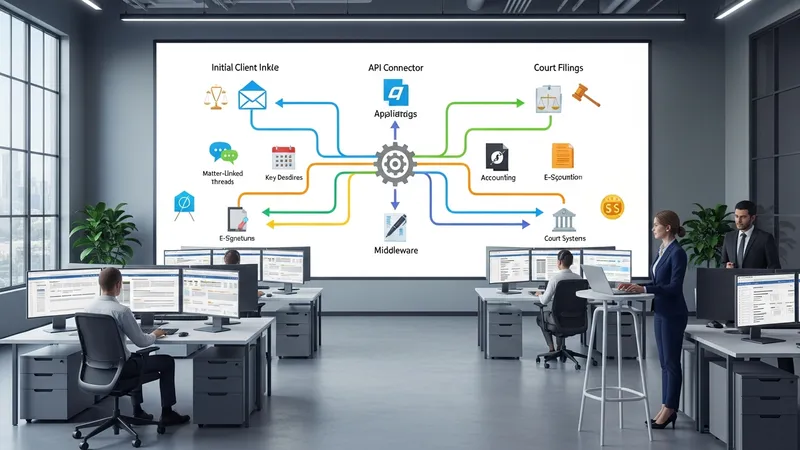
Workflow automation may involve routing new matters to intake staff, triggering task sequences for standard filings, or generating document drafts from templates once certain fields are completed. Automation rules are commonly designed to handle routine or predictable steps, which can free staff for higher-value tasks. However, automation requires governance—documented rules, exception handling procedures, and periodic review to ensure that automated sequences remain aligned with evolving practice requirements.
Designing workflows typically starts with mapping existing processes to identify decision points and handoffs. Clear definitions of who is responsible for each task and what constitutes task completion help reduce ambiguity. Firms often pilot automated workflows in a single practice area to validate assumptions before broader deployment, allowing adjustments to templates, notifications, and escalation paths without major disruption.
When planning integrations and automations, teams commonly consider long-term maintainability. This includes documenting custom logic, tracking version changes, and ensuring staff who manage automation rules have access to necessary training. Periodic audits of automated processes can reveal opportunities for refinement or identify maintenance needs as templates and external requirements change.
Cost models for practice management systems commonly include subscription pricing, perpetual licenses with ongoing maintenance fees, or usage-based arrangements. Subscription models may be priced per user per month or as a bundled firm fee; larger firms sometimes negotiate volume arrangements. Additional costs can arise from implementation, data migration, customization, training, and third-party integrations. Firms often budget for an initial implementation phase and an ongoing operational budget that covers support, maintenance, and periodic upgrades.

Deployment choices—cloud, on-premises, or hybrid—affect operational responsibilities and cost distribution. Cloud services may reduce upfront infrastructure expenses and shift responsibility for uptime and security to the vendor, while on-premises deployments can provide more direct control over data and customization. Hybrid models may be used to keep sensitive data local while leveraging hosted services for collaboration tools. Each approach typically requires consideration of internal IT capacity, disaster recovery needs, and regulatory obligations.
Support and training are common determinants of long-term adoption. Vendors or implementation partners often provide onboarding, administrator training, and user materials that can influence how rapidly staff adopt new processes. Some firms establish internal super-users who serve as local points of contact and help tailor training to firm-specific workflows. Regular review sessions after go-live can address adoption barriers and inform refinements to configuration or documentation.
Governance and total cost of ownership considerations typically include planned review cycles for software configuration, periodic reassessment of license utilization, and ongoing alignment of the system to evolving practice needs. Firms may set metrics for measuring adoption and operational impact, and use those measures to prioritize enhancements. A measured approach to rollout and budgeting may help ensure that technology investments remain aligned with firm objectives without introducing undue operational risk.